Why Onboarding Outsourced Talent is Harder Than You Think

Why Onboarding Outsourced Talent is Harder Than You Think

4 December 2024

|

IconInument

Icon Icon Icon

The Challenges of Onboarding Outsourced Talent

Outsourcing has become a common strategy for businesses to scale quickly and access specialized skills. However, the onboarding process is often more complex than expected. Here are some of the key reasons why onboarding outsourced talent is harder than you think:

  1. Communication Barriers

Clear communication is crucial to ensure successful onboarding. When working with outsourced talent, especially across different time zones, language barriers and differing communication styles can lead to misunderstandings.

    • Language Differences: Even if outsourced talent speaks English fluently, regional variations, accents, or different levels of proficiency can lead to confusion.
    • Time Zone Challenges: Managing teams across multiple time zones complicates the scheduling of meetings and response times, slowing down the onboarding process.
    • Technology Gaps: Differences in technological tools and platforms used for communication and collaboration can further hinder effective communication.

Tip: Invest in robust communication tools and establish clear protocols to ensure consistent and effective interaction with outsourced teams.

  1. Cultural Differences

Cultural differences between your in-house team and outsourced talent can lead to clashes in expectations and work styles. These differences affect everything from communication and collaboration to how tasks are prioritized and deadlines are met.

    • Work Ethic Variations: In some cultures, work may be done in a more formal, structured manner, while in others, a more flexible approach may be preferred.
    • Decision-Making Styles: In certain regions, decision-making is highly hierarchical, while in others, it is more decentralized, leading to confusion and inefficiencies during onboarding.

Tip: Offer cross-cultural training for both in-house and outsourced teams to foster understanding and improve collaboration.

  1. Lack of Proper Onboarding Systems

Many outsourcing companies rely on generic onboarding processes that don’t account for the unique challenges of working with remote teams. A lack of a customized, efficient onboarding system can result in confusion and missed expectations.

    • Insufficient Training: Outsourced workers may not receive the same level of training as in-house employees, leading to gaps in knowledge and skills.
    • Unclear Role Definition: Without clear documentation or guidance, outsourced talent may struggle to understand their roles and responsibilities within the company.

Tip: Implement tailored onboarding programs that focus on specific company practices, tools, and workflows relevant to the outsourced roles.

  1. Technology Integration Issues

Integrating outsourced talent into your company’s existing technological ecosystem can be a major hurdle. From different software preferences to security concerns, technological integration requires careful planning and execution.

    • Access to Internal Systems: Ensuring that outsourced workers have the right access to internal systems and platforms can take longer than anticipated.
    • Security Risks: Working with third-party contractors increases the risk of security breaches. Protecting sensitive data and ensuring compliance with industry standards can be more complicated.

Tip: Create a secure onboarding process that includes VPN access, two-factor authentication, and data protection measures to ensure smooth integration with your systems.

  1. Legal and Compliance Challenges

Different countries have different labor laws and regulations, which can make it difficult for outsourcing companies to navigate the legal landscape of working with outsourced talent.

    • Contractual Obligations: Companies need to ensure that contracts with outsourced workers comply with local labor laws, including worker classification and payment terms.
    • Tax and Regulatory Compliance: Global outsourcing often involves compliance with different tax regulations, social security contributions, and other local requirements.

Tip: Consult with legal experts to ensure all contracts and operations comply with the laws of both your company’s location and the outsourced team’s location.

  1. Building Trust and Engagement

Outsourced teams, especially remote ones, may feel disconnected from your company’s mission and culture. Without a strong sense of engagement and trust, outsourced talent can feel isolated, affecting performance and morale.

    • Lack of Personal Interaction: Remote workers are often at a disadvantage when it comes to building personal relationships with in-house teams, leading to feelings of isolation.
    • Team Integration: Ensuring that outsourced talent feels like a part of the team and is invested in your company’s success can be difficult in a virtual environment.

Tip: Schedule regular check-ins, foster informal communication, and involve outsourced talent in team-building activities to enhance engagement and trust.

Best Practices for Overcoming Onboarding Challenges

To address these challenges, companies can implement several best practices that streamline the onboarding process for outsourced talent:

  1. Structured Onboarding Programs

A structured, step-by-step onboarding program can set expectations from the start and ensure a smooth integration process.

    • Orientation: Introduce outsourced employees to your company’s culture, values, and processes.
    • Training: Provide role-specific training and resources to ensure a strong understanding of job expectations.
  1. Use Collaboration Tools

Leverage tools like Slack, Microsoft Teams, and Zoom to improve communication and foster collaboration between in-house and outsourced teams.

  1. Create Clear Documentation

Ensure that job roles, expectations, and workflows are clearly documented and easily accessible to outsourced employees.

  1. Provide Ongoing Support

Offer continuous support and mentorship to outsourced talent to ensure they have the resources they need to succeed.

Onboarding outsourced talent requires more than just transferring tasks—it requires careful planning, attention to cultural nuances, and the right technological tools. By addressing communication gaps, cultural differences, and logistical challenges, businesses can create a more efficient and successful onboarding process, leading to better integration, higher productivity, and greater long-term success.

For additional resources on optimizing outsourcing strategies, check out this guide from Harvard Business Review on managing remote teams effectively.

0 Comments

Leave a comment

Your email address will not be published. Required fields are marked.

Want to Build Your Dream Tech Team? Hire Now!

Unlocking Business Potential with Design as a Service (DaaS)

Unlocking Business Potential with Design as a Service (DaaS)

20 November 2024

|

IconInument

Icon Icon Icon

What is Design as a Service (DaaS)?

Design as a Service (DaaS) refers to a model where businesses can access professional design services on a subscription or project basis, rather than hiring full-time in-house designers. This service model is particularly beneficial for startups, small businesses, and enterprises looking for flexible, scalable, and cost-effective design solutions.

How DaaS Works

  • On-demand access: Clients can request design work as needed, ranging from logos and branding to UX/UI designs and marketing collateral.
  • Subscription models: Many DaaS providers offer tiered subscription models, allowing businesses to choose a package that fits their design needs and budget.
  • Collaboration: Through digital platforms, businesses can communicate with design teams, provide feedback, and track project progress in real-time.

DaaS bridges the gap between in-house design teams and outsourced design agencies, offering a hybrid solution that’s efficient and adaptable.

Benefits of Design as a Service (DaaS)

Leveraging DaaS can have profound advantages for businesses looking to unlock their potential and maintain a competitive edge.

  1. Cost-Effective Design Solutions: One of the most significant advantages of DaaS is its cost efficiency. Traditional in-house design teams come with overhead costs, including salaries, benefits, and training. In contrast, DaaS providers offer more affordable solutions with flexible pricing structures.
    • Cost comparison: Hiring a full-time designer can cost anywhere between $50,000 to $120,000 annually, depending on experience and location. In contrast, a DaaS model allows businesses to pay only for the designs they need, often at a fraction of the cost.
  1. Scalability and Flexibility: DaaS enables businesses to scale their design requirements up or down based on project needs. Whether launching a new product or executing a one-time marketing campaign, businesses can access design resources without committing to long-term contracts or hiring additional staff.
    • Example: A company may need extensive design work for an upcoming product launch but only require minimal design updates for routine marketing tasks.
  1. Access to Expertise: With DaaS, businesses gain access to a pool of experienced designers across various disciplines (e.g., graphic design, UI/UX, web design, and motion graphics). This access to specialized skills ensures that each project receives expert attention, enhancing the overall quality of design work.
  1. Faster Time-to-Market: By outsourcing design tasks to a dedicated team, businesses can reduce the time it takes to finalize products, marketing materials, and user interfaces. This agility is especially valuable in fast-paced industries where time-to-market can be a competitive differentiator.

Key Use Cases for Design as a Service (DaaS)

DaaS is suitable for a range of business needs, from small startups to large enterprises. Below are some key use cases where DaaS can significantly impact growth.

  1. Branding and Identity Development: Building a strong brand identity requires consistent design across multiple touchpoints, including logos, websites, and promotional materials. DaaS allows businesses to build and refine their brand identity with professional-grade designs without the need for an in-house team.
    • Statistic: 75% of consumers make judgments about a company’s credibility based on its website design (WebFX).
  1. User Experience (UX) and User Interface (UI) Design: Startups and tech companies can particularly benefit from DaaS for user interface (UI) and user experience (UX) design. High-quality, intuitive designs lead to better customer retention and higher conversion rates.
    • Key benefit: Custom UI/UX designs ensure that products are user-friendly, leading to higher customer satisfaction and a seamless digital experience.
  1. Marketing Collateral and Advertising Campaigns: From social media graphics to email templates and banner ads, DaaS helps businesses create a consistent and appealing visual language for marketing efforts. A strong visual presence can dramatically increase brand recognition and engagement.
    • Statistic: Visual content is likely to be shared on social media than other types of content (Visme). 
  1. Website and Mobile App Design: Having a responsive, aesthetically pleasing website or mobile app is critical for modern businesses. DaaS providers can design these digital platforms efficiently, optimizing them for performance, SEO, and user engagement.
    • Example: A small e-commerce store can leverage DaaS to design a sleek, user-friendly website without the expense of hiring an entire development and design team.

Choosing the Right DaaS Provider

Selecting the right Design as a Service provider is essential to achieving the best results. Here are some factors to consider:

  1. Expertise and Portfolio: Look for a DaaS provider with a strong portfolio that showcases relevant experience in your industry. Check if their previous work aligns with your brand’s style and the complexity of the projects you need.
  2. Project Management Tools: Efficient communication and project tracking are crucial for successful collaboration. Choose a DaaS provider that offers seamless project management tools, such as Trello, Asana, or Slack, to facilitate clear and timely communication.
  3. Client Reviews and Testimonials: Before committing to a provider, check for reviews or case studies from other clients. Positive feedback and testimonials can help validate the quality and reliability of the service.
  4. Turnaround Time and Deadlines: Ensure that the provider can meet your deadlines. Fast turnaround times without compromising quality are essential for businesses operating in fast-paced environments.

Measuring the Impact of DaaS on Your Business

To understand the value of Design as a Service, it’s essential to track performance and measure the outcomes of your design initiatives.

  1. Return on Investment (ROI): Assess the impact of design projects on your revenue growth. For example, after launching a new website or marketing campaign designed through DaaS, track metrics like conversion rates, customer acquisition, and overall sales performance.
  1. Brand Recognition: Monitor changes in brand visibility and recognition through engagement metrics on social media, website traffic, and customer feedback. Stronger branding can lead to increased customer loyalty and higher brand equity.
  1. Customer Satisfaction and Retention: Quality design often correlates with better customer satisfaction. Use surveys or Net Promoter Scores (NPS) to measure how users perceive the quality of your products or services, particularly those that involve design elements (e.g., websites or mobile apps).

Design as a Service (DaaS) offers a transformative approach for businesses looking to unlock their full potential by accessing high-quality, on-demand design resources. By leveraging flexible, scalable design solutions, businesses can improve branding, streamline product development, and drive marketing success, all while maintaining cost efficiency and agility.


0 Comments

Leave a comment

Your email address will not be published. Required fields are marked.

Want to Build Your Dream Tech Team? Hire Now!

How AI is Revolutionizing Non-Profit Organizations

How AI is Revolutionizing Non-Profit Organizations

24 October 2024

|

IconInument

Icon Icon Icon

AI is not something that is yet to be experienced but is currently being experienced in different industries in the global market. AI gives non-profit organizations the opportunities of how to solve traditional issues and make a huge impact because they are always limited with resources. From the acquisition of donors to the programs that are implemented, or even the fundraising, the use of AI is changing the non-profit organizations in ways that were unimaginable a few years ago.

Revolutionizing Donor Engagement and Fundraising

Fundraising is a key element in non-profit organizations and with the help of AI, the way the organizations obtain and distribute funds is evolving. Whereas conventional fundraising approaches are founded on general solicitations, AI is revolutionizing non-profit fundraising by offering specific approaches. A good example is Greenpeace that leverages on Dataro’s AI tools to improve on their fundraising.

Greenpeace’s AI-Driven Success

Direct Mail Appeals: Greenpeace AU employed AI to optimize their direct mail campaigns. Dataro’s AI-driven predictions achieved a response rate of over 14%, compared to just under 9% with traditional segmentation. This resulted in a potential revenue increase of 23% and over 2,800 individual gifts, versus around 2,500 from traditional methods, despite working with a smaller list of donors.

This chart shows the ROI from each discrete group of donors that were identified in the two mailing lists:

  • Red: Donors chosen using traditional RFM segmentation but not flagged as worthwhile by the machine learning tool
  • Green: Donors selected by Dataro’s machine learning algorithm but not chosen through RFM segmentation
  • Blue: Donors who appeared in both the AI and RFM mailing lists

Reducing Donor Churn: AI also improved donor retention by identifying those at risk of lapsing. Personalized “thank you” calls helped Greenpeace retain 64 donors who might have otherwise dropped off, saving the organization $23,040.

These AI-driven strategies significantly enhanced Greenpeace’s fundraising effectiveness and donor engagement. For a deeper look, explore the full case study here.

Enhancing Program Delivery with Precision and Efficiency: As non-profit organizations are likely financially constrained, it is important that they are efficient. The use of AI can be very meaningful in enhancing the delivery of the program and ensuring that the available resources are properly utilized.

An example of an organization that falls under the category of non-profit organization with focus on disaster management. Thus, the organization can estimate where help is needed most using weather forecasts, social media updates, and ground-level devices with the assistance of AI. For instance, in the 2019-2020 Australian bushfires, Microsoft applied AI in the identification of the fires’ scope and effects by analyzing satellite images and social media posts. It also assisted in the allocation of emergency resources to the areas most in need and offered valuable information for the fighting and alleviation of fires.

Empowering the Use of Data for Decision-Making to Achieve Bigger Outcomes: Think of a healthcare non-profit organization that employs AI in tracking diseases incidences in real-time. For example, the World Health Organization (WHO) uses artificial intelligence in monitoring and analyzing disease trends across the world. AI can predict the outbreaks by analyzing the data from the hospitals, clinics, and public health reports and allocate resources to the most effective interventions.

This real-time data enables timely responses and optimal utilization of resources, which have a direct bearing on the health of the public.

AI is also very crucial in increasing transparency and accountability in the non-profit organizations. For instance, the Gates Foundation uses AI in monitoring and evaluating its programs. AI tools are used to evaluate the impact of such programs as the “Global Health” program by analyzing the data collected by AI tools. These insights assist in establishing the effectiveness of their programs to the stakeholders hence attracting more support and trust.

Optimizing Volunteer and Workforce Engagement: With the help of AI algorithms, the matching of volunteers with opportunities can be enhanced and can be done according to their skills and preferences. For instance, United Nations Volunteers (UNV) use AI in the volunteer recruitment process to assign volunteers to the right positions depending on their qualifications and interests. This not only increases the satisfaction level of the volunteers, but also assigns the volunteers to the right position which they can do best.

AI can help in the distribution of tasks and their coordination to avoid overworking volunteers and at the same time, ensure that all the work is well shared. For instance, the American Red Cross has implemented AI systems to help it to organize and assign volunteers’ shifts. It assists in the management of working hours and distribution of tasks to avoid overworking the volunteers and at the same time ensure that the volunteers are utilized to the maximum.

Ethical Issues in the Management of Artificial Intelligence: AI systems are usually designed to work with the data that contains personal information, which is a crucial issue of privacy. AI practices for non-profit organizations must be designed in a way that data is not exposed to breaches and misuse. For instance, the International Federation of Red Cross and Red Crescent Societies (IFRC) has stressed on the need for strong data protection measures in its AI projects. Maintaining the confidentiality of data is another factor that keeps the supporters and beneficiaries informed and trusting the organizations as they have sound policies and follow international data protection guidelines (IFRC, 2024).

Prejudice in AI systems can be perpetuated if not given a right approach to handle them. AI is a powerful tool that non-profit organizations need to incorporate, but the tools used must be equitable. For example, the non-profit organization called Fairness Labs focuses on the process of auditing AI systems to make sure that they are fair and do not discriminate against any community. Periodic reviews and openness in the creation of AI systems assist in reducing bias and enhancing fairness.

The Future of AI in Non-Profits: New Possibilities Await: AI is expected to bring significant changes in the non-profit organizations in the future. In education, AI can help children to have individual learning process, for example, Khan Academy using AI to adapt content. In healthcare, AI tools can solve the problem of unequal access to medical care in rural areas, for example, the project Health4All, which uses artificial intelligence in healthcare. Furthermore, AI can be used in climate change as it involves analyzing of data to come up with the best strategies.

In the future as AI technology advances non-profit organizations will be more capable of handling a variety of social problems. Therefore, by embracing AI in its operations, non-profits are in a position to increase their effectiveness in delivering their mandate and achieve great social changes for the benefit of the society.

AI is not a passing fad but a revolution that is set to change the non-profit organizations. More Than Half of nonprofits now use A. I. for some tasks, as reported by the The Chronicle of Philanthropy, a development that has been achieved within one year of the availability of the technology. It is not only about following the trends in technology but about changing the nature of organizations and their impact. Non-profits are now using the AI strategies just like Greenpeace and other organizations and are achieving great results with a 23% increase in revenues and improved donor interaction. AI’s ability to enhance disaster response and real-time disease tracking proves that it can effectively respond to significant global issues.

0 Comments

Leave a comment

Your email address will not be published. Required fields are marked.

Want to Build Your Dream Tech Team? Hire Now!

How AI is Changing the Future of Technology

How AI is Changing the Future of Technology

25 September 2024

|

IconInument

Icon Icon Icon

AI is no longer a thing of the future but a present-day reality that has found its way into most industries across the world. The use of AI is seen in almost every sector ranging from the healthcare sector, the finance sector, manufacturing sector, and the retail sector, at the workplace, in our everyday activities, and even in the way we communicate.

This blog post considers the application of AI in various sectors and the pros, the cons, and the question of morality. We will examine how this technology is changing industries, improving operations, and creating value.

So we enter the world of AI, let’s have a look how Artificial Intelligence can transform the world positively.

AI Impact on Different Industries

  • Healthcare: AI is changing the health sector through improved diagnosis, personalized treatment, and development of new drugs. For instance, in the case of IBM, its Watson Health applies AI in analyzing medical data and assist in identifying diseases like cancer with higher efficiency than other techniques. Furthermore, AI algorithms play a critical role in precision medicine where treatments are made according to the patient’s needs and with minimal side effects. One is Tempus which applies AI in evaluation of clinical and molecular information hence enhancing the treatment regimes. In drug discovery, organizations such as BenevolentAI employ AI to analyze large data sets, and find potential drug compounds and expedite the process as they did with neurological disorders treatment.
  • Finance: In the finance industry, AI improves decision-making by analyzing data intelligently and applying algorithms in trading. For instance, the firm known as Renaissance Technologies uses machine learning methods to analyze market data and make trades, which generates substantial profit. AI is also important in the management of risks for example, Darktrace employs AI to identify threats and counter them in real-time, thus protecting financial institutions from fraud.
  • Manufacturing: AI is being used in the manufacturing industry in two ways namely the prediction of the failure of the equipment used in the manufacturing process and the actual manufacturing process. For example, Siemens applies AI in maintenance and prediction where the company is able to predict when a certain machine is likely to develop a fault and rectify it before it does hence sparing the company the costs of having to do a stop on operations. In addition, the collaborative robot or cobot including the Universal Robot is improving the functionality of the production line and the quality of the products through the execution of complicated activities.
  • Retail: AI is transforming the retail business by enhancing the experience of the consumers and the stock. For example, Amazon uses AI algorithms to recommend products to the customers based on their previous browsing and purchasing history, thus boosting its sales and customer satisfaction. In inventory management, AI is used in Walmart to forecast demand trends in order to prevent stock out and stock in situations thus improving organizational performance.
  • Transportation: AI is also in the center of the advancement in transport through the development of the self-driving cars and smart cities. The application of self-driving cars is being worked on by companies like Waymo where AI is applied to analyze the data collected by the sensors and to prevent an accident and therefore reduce the rate of road accidents. In urban transportation AI is enhancing the traffic management systems in cities like Los Angeles making traffic congestion, public transport and at the same time enhancing sustainability.

Artificial Intelligence and the Future of Work

The implications of this technology on the workforce are now being felt with the advancement of the AI technology. AI is no longer making work automated and mechanical but is making work more human by enabling people to do more valuable work.

For example, in the manufacturing industry; FANUC has developed robots with artificial intelligence that perform repetitive operations while people focus on improving on the process and coming up with new innovations.

The future work environment will be man and machine in which artificial intelligence will augment human work and not disappear it.

For instance, in today’s world, AI is helping professionals in the healthcare and financial industry to sort through data while the specialist can focus on more complex work.

It is believed that the cooperation between AI and creativity will lead to advancement in fields like science, medicine and technology.

Ethical Considerations and Challenges

The rise of AI presents several ethical challenges:

  1. Bias in AI Systems: Machine learning algorithms can reproduce the biases existing in the training data set. For instance, Amazon had to pull an AI tool meant for recruitment because it discriminated against female candidates and in favor of the male ones, which was because of the data that the tool was trained on.
  2. Privacy Concerns: AI applications function under the consideration of processing a vast amount of personal data, which leads to the issue of data protection. Some of these worries are addressed by GDPR regulations in the EU as they set stringent rules regarding data processing and protection of personal data.
  3. Regulation and Governance: For AI to be used responsibly, proper AI governance has to be observed. The AI Act that has been introduced by the European Commission is expected to set legal measures that would cover the risks that are related to AI while at the same time, encourage development.

What Are The Future Implications?

  • Quantum Computing: Quantum computing is one of the new technologies that could improve AI in solving its problems. IBM’s Qiskit project is an example of how quantum computing could revolutionize AI by solving complex problems beyond current computational limits.
  • Biotechnology: AI is set to revolutionalise biotechnology through discovery of other treatment solutions. For example, DeepMind’s AI has been applied to the protein folding prediction, which may have a great effect on the drug development and disease cure.

AI is the most prominent technology that is shaping the future in different industries. It has affected the areas of medical, banking, industrial, commercial and transport and has introduced new prospects and shifts. Thus, as we continue the discussion of the ability of AI and its opportunities, the question of ethical issues and the ways to avoid the misuse of AI will remain one of the key factors that will define the possibility to use it in various fields for the benefit of people. It will be the main theme to accept the opportunities that AI brings in and at the same time, control the risks that come with it to shape the future of human-technology interaction.

0 Comments

Leave a comment

Your email address will not be published. Required fields are marked.

Want to Build Your Dream Tech Team? Hire Now!

7 Advantages of SaaS (Software as a Service)

7 Advantages of SaaS (Software as a Service)

23 August 2024

|

IconInument

Icon Icon Icon

Businesses are increasingly turning to Software as a Service (SaaS) solutions to enhance efficiency and stay competitive. SaaS, which delivers software applications over the internet, offers a host of advantages that traditional software models often cannot match. From cost savings to seamless updates and remote access, SaaS is transforming the way companies operate. In this article, we’ll explore the key benefits of SaaS, highlighting why it’s becoming the go-to choose for modern businesses.

Read Also: Top 5 Software Development Companies for Future-Ready Solutions

1. Cost Efficiency

  • Lower Initial Investment: SaaS solutions typically require no upfront hardware costs or extensive software purchases. Instead, businesses pay a subscription fee, which can be significantly lower than traditional software licensing. Businesses can save up to 30% on IT costs by shifting to SaaS solutions.
  • Reduced IT Overheads: SaaS vendors manage all maintenance, updates, and support, reducing the need for in-house IT resources. This allows companies to redirect funds and personnel to more strategic initiatives.
  • Pay-as-You-Go Model: Businesses only pay for what they use, which can significantly reduce costs, especially for small and medium-sized enterprises (SMEs).

2. Scalability and Flexibility

  • Easy Scalability: SaaS platforms offer flexible subscription models, allowing businesses to easily scale their software usage up or down based on current needs. 70% of organizations find SaaS scalability to be a significant advantage, helping them adapt to changing business demands.
  • Integration Capabilities: SaaS applications often integrate seamlessly with other software, enhancing overall functionality and efficiency.
  • Customizable Solutions: Many SaaS providers offer customizable features and modules, enabling businesses to tailor the software to their specific needs without significant development costs.

3. Performance and Reliability

  • High Availability: SaaS solutions are designed for high availability and reliability, often offering Service Level Agreements (SLAs) that guarantee uptime.
  • Disaster Recovery: SaaS providers typically offer robust disaster recovery options, ensuring data is backed up and can be quickly restored.

4. Automatic Updates and Maintenance

  • Continuous Improvements: With SaaS, updates and new features are automatically deployed without requiring user intervention. This ensures that businesses always have access to the latest software capabilities and security patches.
  • Reduced IT Burden: With the provider managing the infrastructure, businesses can reduce their IT workload and focus on core activities.
  • Reduced Downtime: Since updates are handled by the service provider, businesses experience less downtime compared to traditional software updates, which often require complex installation processes.

5. Remote Access and Collaboration

  • Access from Anywhere: SaaS applications are typically accessible via web browsers, enabling users to work from any location with internet connectivity. This remote access capability supports flexible work arrangements and increases productivity.
  • Enhanced Collaboration: Many SaaS platforms include collaborative features such as real-time document sharing and communication tools, which enhance teamwork and streamline project management.

6. Security and Compliance

  • Robust Security Measures: SaaS providers often implement advanced security protocols, including encryption, firewalls, and regular security audits, to protect user data. This level of security can be more comprehensive than what many small to mid-sized businesses can afford on their own.
  • Compliance Support: SaaS vendors often adhere to industry standards and regulatory requirements, helping businesses meet compliance obligations more easily. For instance, many SaaS providers are compliant with GDPR and HIPAA regulations.

7. Integration and Compatibility

  • Seamless Integration: SaaS solutions are designed to integrate easily with other software and systems. This interoperability helps businesses streamline their operations and ensures data consistency across various platforms.
  • Cross-Platform Compatibility: Most SaaS applications are accessible on multiple devices and operating systems, facilitating a more versatile and user-friendly experience.

SaaS offers a range of advantages, including cost savings, scalability, automatic updates, remote access, and robust security. By leveraging these benefits, businesses can enhance their operational efficiency and adapt more quickly to evolving market conditions. For more insights on SaaS trends and benefits, visit Gartner’s SaaS Research or explore Forrester’s SaaS Studies.

0 Comments

Leave a comment

Your email address will not be published. Required fields are marked.

Want to Build Your Dream Tech Team? Hire Now!

Partnering with an Offshore Technology Provider: The Key to a Robust IT Resourcing Strategy

Partnering with an Offshore Technology Provider: The Key to a Robust IT Resourcing Strategy

6 August 2024

|

IconInument

Icon Icon Icon

In today’s fast-paced and dynamic business environment, having a strong IT resourcing strategy is essential for the success of any organization. With technology playing an increasingly critical role in every aspect of business operations, companies need to ensure that they have the right talent and resources to meet their IT needs. One of the most effective ways to do this is by partnering with a reliable offshore technology provider.

Offshore technology partners offer a range of benefits that can help organizations to maximize their IT resources and stay ahead of the competition. Here are some of the key reasons why your IT resourcing strategy needs a strong offshore technology partner:

  1. Cost Savings: One of the most significant advantages of working with an offshore technology partner is cost savings. Offshore providers typically offer lower HR costs compared to onshore providers, which can help companies to reduce their IT spending without compromising on quality. Additionally, partnering with an offshore provider can help organizations to avoid the costs associated with hiring and training in-house IT staff.
  2. Scalability and Flexibility: Offshore technology partners offer a high degree of scalability and flexibility, which can be especially beneficial for companies that have fluctuating IT needs. Offshore providers can quickly ramp up or down their resources as needed, allowing organizations to be more agile and responsive to changing business requirements. Additionally, offshore partners can help companies to navigate peak workloads and seasonal demands without having to invest in additional infrastructure or staff.
  3. Improved Time-to-Market: Offshore technology partners can help organizations to accelerate their time-to-market by providing access to cutting-edge technologies and development methodologies. With an offshore partner, companies can leverage the latest tools and techniques to deliver high-quality products and services quickly and efficiently.
  4. 24/7 Support: Offshore technology partners often offer 24/7 support, which can be especially beneficial for organizations with global operations or those that require round-the-clock IT support. With an offshore partner, companies can ensure that they have access to skilled professionals whenever they need them, regardless of time zones or geographic location.
  5. Language and Cultural Diversity: Offshore technology partners can bring a valuable diversity of language and culture to an organization, which can be especially beneficial for companies with international clients or stakeholders. Working with an offshore partner can help companies to better understand and navigate the nuances of different cultures and languages, improving communication and collaboration across borders.
  6. Risk Mitigation: Offshore technology partners can help organizations to mitigate risks associated with IT projects by providing expert guidance and support throughout the development process. Offshore providers often have extensive experience working on complex IT projects, which can help organizations to avoid common pitfalls and ensure successful project outcomes.
  7. Focus on Core Business: Partnering with an offshore technology provider can help organizations to focus on their core business while leaving IT development and support to the experts. Offshore providers can handle all aspects of IT development, from software design and coding to testing and deployment, allowing organizations to focus on their core competencies and strategic objectives.
  8. Innovation: Offshore technology partners can bring fresh perspectives and innovative ideas to an organization, helping to drive innovation and creativity in IT development. By working with an offshore partner, organizations can tap into new ideas, methodologies, and technologies that they may not have considered otherwise.

Are you ready to take your IT resourcing strategy to the next level? Partnering with an Inument Solutions Limited can help you achieve your business goals faster, cheaper, and better. Whether you need software development, testing, maintenance, or support, you can find the right partner for your needs and budget. Contact us for more details! 

0 Comments

Leave a comment

Your email address will not be published. Required fields are marked.

Want to Build Your Dream Tech Team? Hire Now!

Types of AI & Impact on Product Engineering

Types of AI & Impact on Product Engineering

1 August 2024

|

IconInument

Icon Icon Icon

In the evolving business world, product engineering leaders face the challenge of steering through uncharted chaos and disruptions. The integration of AI and ML stands as a pivotal force, propelling product teams towards rapid innovation, amplified creativity, and substantial growth. This should be discussed more often now how AI/ML’s revolutionary role in product engineering leadership, shedding light on the diverse applications and capabilities of both Generative AI and Predictive AI.

Generative AI

Generative AI is crafted to generate content or data from user inputs and patterns. It takes the advantages of machine learning to pin point patterns and create distinctive outputs like images, sounds, text & even videos (OpenAI’s Sora).

Key Applications:

  • Generative Adversarial Networks (GANs): A key method for synthesizing realistic images, GANs are instrumental in producing high-quality visuals.
  • Data Augmentation: By supplementing incomplete datasets, Generative AI enhances both the quality and volume of data.
  • Creativity Boost: It aids in fostering creativity, offering fresh ideas and designs, including UI/UX mockups and application wireframes.

Examples:

    • ChatGPT: This expansive language model is adept at crafting text responses that closely mimic human conversation.
    • Midjourney: An AI tool specialized in generating premium images from textual prompts.
    • Runway: A versatile platform that allows for the creation and modification of videos with content generated by AI
    • Sora: A “yet to be public” AI model that can generate close to perfect video by only getting input from users.

Predictive AI

Predictive AI analyses historical data to project future occurrences or patterns. It taps into vast datasets to detect temporal patterns, making educated predictions about upcoming trends and outcomes.

Key Applications:

  • Forecasting: It anticipates future needs, sales, and market movements.
  • Classification: It sorts data into distinct groups, like customer demographics or product categories.
  • Regression: It estimates the variables, for instance, the effect of advertising expenditure on revenue.

Examples:

  • Google Trends: This tool employs predictive AI to anticipate search behavior and trending subjects.
  • Salesforce Einstein: An analytics platform that utilizes AI to predict sales outcomes, customer retention, and other key business indicators.
  • IBM Watson: A collection of AI tools designed for predictive analysis to refine business operations and inform decision-making.

The AI/ML Lifecycle and Product Engineering Leadership

Understanding the full AI/ML lifecycle is crucial for product engineering leaders to fully leverage AI/ML’s capabilities. This includes every phase from data collection and preprocessing to model training and deployment. Fine-tuning models with engineering teams ensures alignment with product vision and strategy.

Key Challenges:

  • Data Collection and Preprocessing: Fundamental for training high-caliber ML models.
  • Feature Selection and Engineering: Vital for crafting precise and potent ML models.
  • Model Training and Deployment: Critical to optimize model potential and reduce risks.

Solutions:

  • AutoML Provider Frameworks: These frameworks address challenges in the AI/ML lifecycle.
  • Knowledge and Usage of AI/ML Algorithms, Models, and Datasets: Leaders should continuously update their knowledge with resources like Kaggle and Hugging Face Hub.
  • Following New Research Work: Keeping up with the latest research in journals such as JMLR and JAIR is essential for staying ahead in the field.

AI and ML empower product engineering leadership to navigate unprecedented chaos and disruptions. By embracing these technologies, leaders can drive business growth, create winning products, and shape the future of their organizations.

Want to Build Your Dream Tech Team? Hire Now!

3 Effective Strategies for a Seamless User Experience

3 Effective Strategies for a Seamless User Experience

27 June 2024

|

IconInument

Icon Icon Icon

User Experience (UX) is a vital part that determines the success of any website or application. A seamless UX not only attracts users but also drives conversions and boosts brand loyalty. Let’s explore three powerful strategies to enhance your UX and keep users coming back for more.

  1. Optimize Loading Speed

Loading speed significantly impacts user experience and site performance metrics. According to KissMetrics 47% of consumers expect a web page to load in 2 seconds or less. This underscores the critical importance of optimizing loading speed to retain visitors and improve conversion rates.

Why It Matters:

  • Statistics: 53% of mobile users abandon a site if it takes more than 3 seconds to load.
  • Google’s Algorithm: Page speed is a crucial factor in Google’s ranking algorithm.

Actionable Steps:

  • Image Optimization: Compress images without compromising quality.
  • Minimize HTTP Requests: Combine multiple style sheets, scripts, and fonts into a single file to minimize HTTP requests.
  • Content Delivery Networks (CDNs): Distribute content across servers globally for faster delivery.
  • Enable Browser Caching: Utilize caching mechanisms to store frequently accessed data locally, reducing load times for returning visitors.


  1. Embrace Minimalism and Clarity

Minimalist design focuses on simplicity and clarity, aiming to remove unnecessary elements that can distract or confuse users. 48% of website visitors say that a website’s design is the number one factor in determining the credibility of a business. A clutter-free interface enhances usability and makes information easier to digest.

Why It Matters:

  • Attention Span: Users have an average attention span of 8 seconds.
  • First Impression: Clear, uncluttered designs create positive first impressions.

Actionable Steps:

  • Whitespace Utilization: Use ample whitespace around elements to give content room to breathe and improve readability.
  • Simplify Content: Focus on essential information and prioritize it based on user needs and goals.
  • Intuitive Navigation: Simplify menus and ensure logical flow.
  • Consistent Branding: Maintain a consistent color scheme, typography, and visual style across the website to reinforce brand identity.


  1. Personalize the Journey

Personalizing the user journey involves tailoring content, recommendations, and interactions based on user behavior, preferences, and demographics. Businesses should not make users frustrated with website content that is not personalized, highlighting the importance of delivering relevant experiences to enhance engagement and satisfaction.

Why It Matters:

  • Conversion Rates: Personalized experiences lead to 4 times higher conversion rates.
  • User Satisfaction: 74% of users feel frustrated with irrelevant content.

Actionable Steps:

  • User Segmentation: Understand user behavior and preferences.
  • Dynamic Content: Show personalized recommendations based on past interactions.
  • Tailored Communication: Address users by name and provide relevant updates.

By implementing these strategies, you’ll create a user experience that resonates, converts, and leaves a lasting impression. Remember, a seamless UX isn’t just about aesthetics; it’s about meeting users’ needs efficiently and delightfully.

0 Comments

Leave a comment

Your email address will not be published. Required fields are marked.

Want to Build Your Dream Tech Team? Hire Now!

Elements of a Production-Ready ETL Job with Apache Spark

Elements of a Production-Ready ETL Job with Apache Spark

11 June 2024

|

IconInument

Icon Icon Icon

Welcome, data engineers! Today, we’ll dive into elements of  a production-ready ETL (Extract, Transform, Load) job with Apache Spark. This ETL job will handle data ingestion from various sources, perform transformations, and manage loading tasks, all while ensuring scalability, reliability, and maintainability.

Introduction to Apache Spark ETL Jobs

Apache Spark is a powerful distributed computing framework that provides high-level APIs in Java, Scala, Python, and R. It excels at processing large datasets efficiently and offers a rich set of libraries and functions for various data processing tasks. Here, we’ll focus on important aspects of building an ETL job using Apache Spark.

Key Components of Spark:

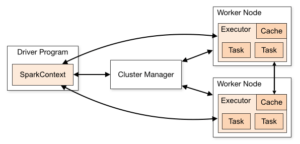
  • Spark Cluster: A Spark cluster is a collection of nodes where Spark jobs are executed. It consists of a master node that manages the cluster and worker nodes that execute the jobs. The cluster architecture allows for parallel processing and efficient handling of large-scale data.
  • Spark Driver: The Spark Driver is the central process that coordinates the execution of a Spark job. It converts the user’s code into a series of tasks that are distributed across the worker nodes. The driver also keeps track of the execution status and resource allocation.
  • Spark Executors: Executors are worker processes that run on the cluster’s worker nodes. They perform the actual computations and store the data needed for the tasks. Each executor is responsible for executing a subset of tasks and reporting the results back to the driver.
  • SparkContext: The SparkContext is the main entry point for interacting with Spark functionality. It allows you to create RDDs (Resilient Distributed Datasets), accumulators, and broadcast variables. It also provides configuration options and manages the lifecycle of the Spark application.

Common Project Structure and Dependencies

Spark project consists of several modules organized in a structured manner:

  • Common Dependencies: This module contains shared utilities, helper functions, and configuration files that are used across different parts of the project. It ensures consistency and reusability of code.
  • ETL Modules: ETL (Extract, Transform, Load) modules implement the logic for data extraction, transformation, and loading. These modules are organized into dedicated functions or classes, making it easier to test and maintain each part of the ETL process independently.
  • Environment Configuration: This component stores environment-specific configurations such as database connection strings, API keys, and file paths. It allows the ETL job to adapt to different environments (e.g., development, staging, production) without changing the code.
  • Main ETL Job Script: The main ETL job script is the entry point for executing the ETL job. It initializes the Spark context, sets up the necessary configurations, and orchestrates the execution of the ETL modules. This script is typically run using the spark-submit command.

Key Features of the ETL Job:

  • Modular Structure: The ETL job is designed with a modular structure, separating the extraction, transformation, and loading steps into dedicated functions or classes. This approach enhances testability and maintainability by allowing each part of the ETL process to be developed and tested independently.
  • Dependency Injection: Dependency injection is used to manage object dependencies within the ETL job. This practice improves modularity and testability by decoupling the creation and use of dependent objects, making it easier to swap out implementations for testing or other purposes.
  • Delta Lake Integration: Delta Lake is integrated into the ETL job for efficient data storage and management. Delta Lake provides ACID transactions, scalable metadata handling, and data versioning, which help in maintaining data integrity and enabling complex data workflows.
  • Integration with External Services: The ETL job integrates with external services such as Redis, ElasticSearch, and others, depending on your use cases. This integration allows for efficient data processing, storage, and retrieval, enabling the ETL job to interact with various data sources and sinks.
  • Error Handling and Logging: Robust error handling and logging mechanisms are implemented to ensure better visibility into the ETL job execution. Detailed logs and error messages help in diagnosing and troubleshooting issues, ensuring that the ETL process runs smoothly and reliably.

Crafting a production-ready ETL job with Apache Spark requires careful planning, design, and implementation. By following best practices and leveraging the capabilities of Apache Spark, you can create robust and scalable data processing pipelines that meet the needs of modern data-driven applications.

Remember, this blog provides a foundational overview of Apache Spark ETL jobs. Explore further, experiment with different configurations, and adapt the techniques to suit your specific use cases and requirements.

Happy data engineering! 

0 Comments

Leave a comment

Your email address will not be published. Required fields are marked.

Want to Build Your Dream Tech Team? Hire Now!

Building a Chat Application with FastAPI, Docker, OpenAI API, and Vector Database

Building a Chat Application with FastAPI, Docker, OpenAI API, and Vector Database

5 June 2024

|

IconInument

Icon Icon Icon

Greetings, developers! Are you ready to embark on an exciting journey of building a modern chat application powered by cutting-edge technologies? FastAPI, Docker, OpenAI API, and Vector Database offer a powerful combination to streamline your development process and create a feature-rich chat application that meets the demands of today’s users. Let’s dive into these technologies, explore their key concepts, benefits, and features, and understand how they come together to simplify the creation of modern chat applications.

What is FastAPI?

FastAPI is not just a web framework; it’s a game-changer for building high-performance APIs with Python. Designed for ease of use, efficiency, and scalability, FastAPI leverages Python’s asynchronous capabilities to achieve blazing-fast performance, making it an ideal choice for building real-time applications like chat applications. With automatic generation of OpenAPI documentation, support for asynchronous programming, and seamless integration with other technologies, FastAPI accelerates development and empowers developers to create robust APIs with minimal effort.

Key Benefits of FastAPI:

  • Rapid Development: FastAPI reduces development time by providing automatic generation of OpenAPI documentation, serialization, and validation of request and response data, and client library generation in various languages.
  • Asynchronous Support: FastAPI fully supports asynchronous programming, enabling non-blocking, concurrent execution of requests and optimal resource utilization.
  • Type Safety: FastAPI leverages Python’s type hinting system to provide type checking at runtime, ensuring code reliability and maintainability.
  • Integration with OpenAI API: FastAPI seamlessly integrates with OpenAI API, enabling developers to incorporate AI-powered chatbot capabilities into their applications effortlessly.

Key Features of FastAPI:

  • Automatic Generation of API Documentation: FastAPI automatically generates interactive API documentation (Swagger UI), making it easy to understand and test API endpoints.
  • Dependency Injection: FastAPI supports dependency injection, enabling better modularity and testability of applications.
  • Data Validation and Serialization: FastAPI automatically validates and serializes request and response data, ensuring data integrity and security.
  • WebSocket Support: FastAPI provides built-in support for WebSockets, enabling real-time, bidirectional communication between clients and servers.

Leveraging Docker for Containerization

Docker revolutionizes the deployment process by containerizing applications, ensuring consistency across different environments and simplifying the deployment process. With Docker, you can package your chat application and its dependencies into a lightweight container, enabling seamless deployment and scalability.

Integrating OpenAI API for Intelligent Chatbot Capabilities

Enhance your chat application with intelligent chatbot capabilities powered by OpenAI API. By integrating OpenAI API, you can provide users with personalized, natural language interactions, enhancing the overall user experience and engagement.

Leveraging Vector Database for Scalable Data Storage

Vector Database offers a modern, scalable solution for storing and querying high-dimensional data, making it ideal for chat applications that deal with complex data structures. With Vector Database, you can store chat logs, user profiles, and other application data efficiently, ensuring fast and reliable access to information.

By harnessing the power of FastAPI, Docker, OpenAI API, and Vector Database, you can build a robust, scalable chat application that meets the needs of modern users. Whether you’re building a small-scale chat application or a large-scale enterprise solution, these technologies provide the tools and capabilities you need to bring your ideas to life. So why wait? Dive into the world of modern chat application development today and unlock the full potential of these cutting-edge technologies.

Remember, this is just the beginning of your journey. Explore, experiment, and leverage the vast resources and community support available to take your chat application to new heights. Happy coding!

0 Comments

Leave a comment

Your email address will not be published. Required fields are marked.

Want to Build Your Dream Tech Team? Hire Now!